
FOR ELECTRICIANS & INSTALLATION TEAMS
Plan smart-home devices alongside the electrics
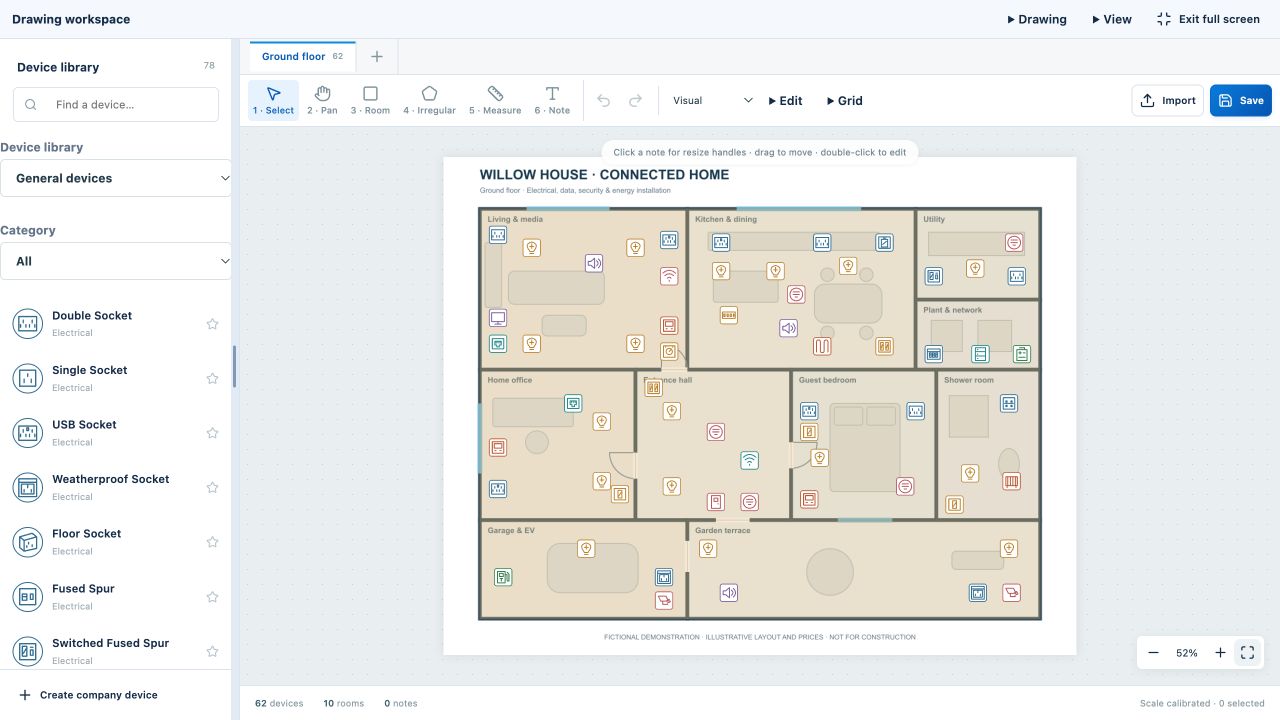
Show keypads, sensors, lighting controls and other automation equipment on the same layout as everyday sockets, data and security devices. Build a coordinated proposal for the customer and a materials list for suppliers.
Separate manufacturer libraries
Browse Loxone, Control4, Lutron and Rako product groups alongside standard electrical categories. Choose the equipment for your project and check current model specifications with the manufacturer.
Explain the room-by-room proposal
Place devices on the floor plan and record descriptions and installation notes. Use the drawing to discuss locations and the estimate to explain the commercial scope of the installation.
Bring equipment costs into the estimate
Maintain supplier prices and references in your company library, review variations and allowances, then create a branded quotation. The project provides a shared context for layout decisions and costs.
Independent planning software
MSG Plan is an independent planning and estimating tool. Manufacturer names and logos identify their products; they do not imply endorsement or affiliation. MSG Plan does not program or directly control these automation systems.
Latest: parts, devices and Final Issue
Select products, colours and extras on Devices, then review project-wide materials totals and drawings in Final Issue. Supplier materials exports contain quantities and part numbers without prices. Check product prices manually before each issue.
Your questions answered
Is this only for Loxone?
No. MSG Plan includes product groups for Loxone, Control4, Lutron and Rako, as well as standard electrical devices.
Where should I check equipment compatibility?
Check current documentation from the relevant manufacturer. A catalogue entry or placement on a drawing is not a compatibility assessment.
Explore the rest of the workflow
Try MSG Plan on your next project
14 days free · 1 user · 5 projects · No card required
Create your account →Ask a question or arrange a demonstration